Planning content used to mean one of two extremes: either you posted spontaneously and hoped momentum showed up, or you built a rigid spreadsheet that looked impressive for three days and then collapsed under the pressure of real life. In 2026, neither option is enough. Creators need a workflow that is structured enough to produce consistently and flexible enough to react to platform shifts, trend spikes, and audience feedback.
That is why AI content planning has become one of the most useful creator workflows this year. HubSpot reported that AI-driven content creation and workflow automation are among the top digital marketing priorities in 2026, while repurposing content across channels remains a major execution focus. At the same time, YouTube is putting more weight behind creators who can serve multiple formats, from long-form and Shorts to image posts in-feed.
The opportunity is not to let AI replace your thinking. The opportunity is to let AI compress the low-leverage planning work so you can spend more time on positioning, storytelling, filming, and publishing. A strong planning system helps you decide what to say, when to say it, which format to use, and how that one idea turns into a week of usable assets.
In this guide, I will break down a practical weekly workflow for AI content planning that fits solo creators, lean teams, and growing media brands. I will also show you where a tool like Harmonif fits naturally into the process so your strategy does not stay trapped in scattered notes and half-finished drafts.
Why content planning matters more in 2026
The content landscape is now more fragmented and more connected at the same time. Your audience might discover you through a YouTube Short, validate you through a long-form video, follow you on Instagram for social proof, and eventually subscribe or buy after a sequence of repeated touchpoints. That means creators are no longer publishing isolated posts. They are building systems of discovery.
YouTube alone continues to expand the number of ways viewers consume content. In January 2026, YouTube said Shorts average 200 billion daily views and that image posts are being integrated into the Shorts feed. That shift matters because it means creators who can package one idea across formats gain more surface area for discovery without having to invent a brand-new topic every day.
Planning also protects creative quality. When you wait until the last minute to decide what to publish, you default to the easiest topic instead of the best one. You also reduce your ability to connect a post to a business goal. Strong planning gives each piece of content a job: attract discovery, build trust, answer objections, convert traffic, or nurture retention.
What AI should handle and what it should not handle
AI is strongest when the task is repetitive, pattern-based, or structurally heavy. It is excellent for organizing content pillars, clustering audience questions, generating angle variations, building weekly content maps, rewriting one idea for multiple platforms, and spotting gaps in your publishing mix. These are the tasks that drain time without necessarily adding originality.
AI is weaker when the task depends on taste, point of view, lived experience, and judgment. It should not be the final voice of your brand. It should not decide which story from your career is worth telling. It should not be trusted blindly with platform context or trend timing. And it should never be allowed to flatten your work into generic motivational sludge.
The best creators in 2026 use AI the way an editor, producer, and operations assistant might be used together. They still own the thesis, the hook, the perspective, and the delivery. AI handles the first pass of organization. The creator shapes meaning.
The weekly AI content planning workflow
Start with inputs, not ideas. Collect platform signals, customer questions, top-performing formats, recent comments, recent wins, and upcoming launches. This gives your planner real material. If you skip this step, every downstream idea will feel abstract and disconnected.
Next, group those inputs into themes. A creator who teaches video growth might have themes like YouTube strategy, creator mindset, monetization, thumbnail testing, and scriptwriting. A wellness creator might group around routines, tools, nutrition, myth-busting, and audience questions. This is where AI can rapidly turn messy notes into clusters.
From there, choose one primary objective for the week. Maybe you want to drive discovery, promote a feature launch, improve consistency, or increase comments from a specific audience segment. Once that objective is clear, AI can help you generate topic angles that support it instead of producing ten random ideas with no shared purpose.
Then assign one hero asset, three supporting assets, and several micro-assets. For example, your hero asset might be a long-form YouTube video. Supporting assets could include a Short, a carousel, and an email snippet. Micro-assets might be title variations, hook options, caption lines, and quote graphics. This is the moment where planning becomes leverage.
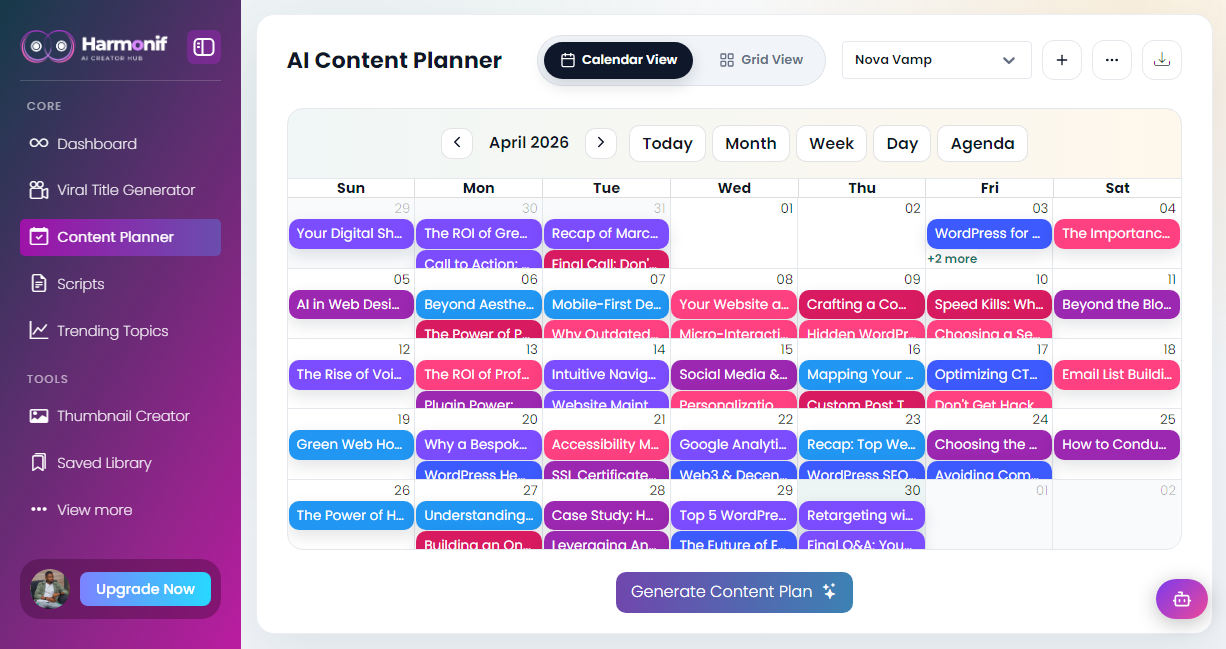
Finally, convert the plan into a visible calendar with statuses. Drafting, scripting, recording, editing, designing, approving, and posting should all exist as steps. A content calendar only works when it behaves like an execution board, not just an idea list.
- Monday: trend review, audience questions, and pillar selection
- Tuesday: hero topic decision, titles, and outline generation
- Wednesday: script drafting, thumbnails, and supporting asset mapping
- Thursday: production and scheduling
- Friday: posting, distribution, and metric review
- Weekend: archive learnings and seed next week’s topics
How to repurpose one idea without repeating yourself
One of the biggest planning mistakes creators make is confusing repurposing with copy-pasting. HubSpot’s 2026 marketing data notes that repurposing content across channels is a top trend, but it also points out that the better-performing teams tailor the content to each channel. That distinction matters. A TikTok script, a YouTube description, and an Instagram caption should not read the same way.
Repurposing works when the core idea stays consistent but the packaging changes. Your YouTube video might explain a method in depth. Your Short might focus on one counterintuitive insight. Your carousel might summarize the framework visually. Your X post might lead with the strongest opinion. Your email might explain the business lesson behind it.
AI makes this easier because it can preserve the idea while adapting structure. Instead of rewriting everything manually, you can prompt for platform-specific transformations while reviewing the output for tone and accuracy. That is the sweet spot between efficiency and originality.
How Harmonif fits into the planning stack
A tool like Harmonif is most useful when it becomes the place where planning stops being theoretical. The content planner helps you map ideas into a schedule. Trending Topics helps you start from live market signals rather than stale assumptions. The Viral Titles Generator gives you variation without losing focus. Script Generator helps you move from outline to delivery. And the Post to socials feature closes the loop so your plan becomes published content.
This matters because creators do not usually fail from a lack of ideas. They fail from fragmentation. Their trends live in one tool, their script notes live in another, their thumbnails live in a design tab, and their posting checklist lives in a chat they never reopen. A connected workflow reduces context-switching and protects momentum.
A simple rule for better planning
If you cannot explain why a piece of content belongs in your weekly plan, it probably does not belong there. Every asset should answer at least one of these questions: what audience is this for, what problem does it solve, what format is best for it, what action should it drive, and what will we learn from publishing it?
When you plan with those questions upfront, AI becomes useful instead of noisy. It stops generating filler and starts accelerating a real strategy. That is the difference between publishing more content and building a repeatable growth engine.
Common mistakes to avoid
The first mistake is treating ai content planning for creators in 2026: a practical weekly workflow like a one-time tactic instead of a repeatable system. Most creators get temporary results when they test a better workflow once, but they fail to turn that workflow into a habit with clear steps, deadlines, and review points.
The second mistake is optimizing for output volume before clarity. More posts, more clips, or more titles do not help if the topic fit is weak, the package is vague, or the audience payoff is unclear. Strong creator workflows usually get simpler as they improve, not noisier.
The third mistake is skipping the review loop. A creator who never checks what actually performed, what felt easy to produce, and what should be turned into a repeatable format keeps starting over. The whole point of a system is to learn faster with each publishing cycle.
What to measure after publishing
Do not judge the success of a content workflow by vanity metrics alone. The better question is whether the content attracted the right audience and created a useful next step. For some posts that means watch time and retention. For others it means saves, replies, profile visits, click-throughs, or movement toward a product or newsletter action.
You should also measure production efficiency. If a topic performs well but takes an unsustainable amount of time to create, it may need a lighter format or a better workflow. The best systems improve both content quality and execution speed over time.
- Discovery metrics: impressions, reach, search visibility, and click-through rate
- Engagement metrics: watch time, saves, comments, replies, and meaningful shares
- Conversion metrics: email signups, app clicks, feature-page visits, and product actions
- Operational metrics: time to publish, number of revisions, and backlog completion rate
Frequently asked questions
What is AI content planning?
AI content planning is the process of using AI tools to organize ideas, build content calendars, generate angles, and map assets across platforms while the creator still controls the strategy and final voice.
How often should creators update a content plan?
Weekly is the most practical rhythm for most creators. It is structured enough for consistency but flexible enough to react to comments, trend shifts, and performance data.
Can AI replace a content strategist?
No. AI can speed up research, organization, and formatting, but it still needs a creator or strategist to define audience fit, messaging priorities, and creative judgment.
Referenced platform updates
This article reflects creator-platform guidance and trend signals current as of April 30, 2026.
Put this workflow into practice with Harmonif
Harmonif gives creators a faster path from idea to publish with tools for content planning, trend discovery, title generation, thumbnail ideation, script writing, and posting to socials.
Get started in the app or explore the full features overview.
A simple 7-day implementation plan
If you want to apply the ideas from AI Content Planning for Creators in 2026: A Practical Weekly Workflow immediately, use the next seven days to turn the theory into a repeatable habit. Keep the scope narrow enough that you actually finish it, then improve it after the first cycle.
- Day 1: define the audience, topic, and outcome you want from the content
- Day 2: gather source material, examples, and recent audience questions
- Day 3: generate angles, titles, or outlines and choose the strongest direction
- Day 4: draft the main asset and map supporting content variations
- Day 5: package the asset with stronger visuals, captions, or supporting copy
- Day 6: schedule or publish the content and distribute it across the right surfaces
- Day 7: review what worked, document the lesson, and update next week’s workflow
By the end of the week, you should have more than a finished post. You should have a clearer process you can run again with less friction.
How different creators can apply this
An educational creator can use ai content planning for creators in 2026: a practical weekly workflow to turn expertise into a more reliable publishing engine. Instead of relying on inspiration, the creator can map recurring audience questions into clear topic clusters, build stronger weekly assets, and repurpose the best lessons into supporting posts that keep discovery active across formats.
A product-led creator or founder can use the same workflow to bridge marketing and product education. Helpful content can answer objections, demonstrate features, compare approaches, and move people toward the next logical action without every post feeling like a sales pitch. This is especially valuable when the audience needs repeated context before converting.
A service provider or consultant can use the framework to turn client knowledge into a library of trust-building assets. The same process that creates a guide, title, or trend response can also create clips, FAQs, case-study angles, and calls to action that feed discovery while reinforcing authority.
In every case, the principle is the same: the workflow should reduce friction between expertise and publication. When the system works, content quality improves because more attention can go to insight and delivery instead of scattered logistics.