AI script tools are everywhere now, but most creators still have the same complaint: the script sounds polished, but it does not sound like me. That complaint is valid. A default AI draft often over-explains simple ideas, uses unnatural transitions, and hides the strongest point behind generic setup lines. It feels organized, but not alive.
Still, writing scripts with AI is worth learning because structure matters more than ever. As YouTube expands multi-format creation and AI-assisted tools become more common, creators who can move quickly from idea to usable script gain an execution edge. The key is not to let AI author the final performance. The key is to make AI behave like a structural collaborator.
This guide will show you how to use AI to generate better video scripts for YouTube videos, Shorts, podcasts, talking-head explainers, and social clips without turning your content into emotionless filler.
Why AI scripts often sound robotic
AI defaults to statistical safety. It has seen a huge number of generic introductions, transition phrases, and polite summaries, so it often reproduces that pattern unless you constrain it. That is why many AI scripts open with empty lines like “In today’s video, we’re going to discuss…” or “If you’ve ever wondered whether…” These are structurally fine and creatively dead.
Robotic scripts also happen when the creator asks AI for too much too early. If your prompt is simply “Write a script about YouTube growth,” the model has no reason to sound like your channel, prioritize your audience, or reflect your real point of view. It will choose the safest average.
The fix is not magical prompting. The fix is giving the tool better inputs and treating the first draft as scaffolding, not as the final performance copy.
Start with a script brief, not a blank prompt
Before generating the script, define the brief in plain language. What is the format? Who is the audience? What should they understand by the end? What emotional tone should the piece carry? What examples, stories, or objections need to appear? What should never be said because it would sound inauthentic to you?
This brief instantly improves output quality because it narrows the model’s range. It replaces generic possibility with strategic intent. If you already know the opening hook, the audience pain point, and the desired payoff, the script becomes much easier to shape.
A good brief also helps you adapt the same idea across formats. A long-form YouTube script needs pacing, chapter logic, and retention resets. A Short script needs a punchy opening and dense value per second. A podcast segment needs conversational flow and breathing room.
Use AI for structure first, language second
The fastest way to get value from AI is to ask it for the structural outline before the full script. Request an opening hook, a problem setup, three main beats, an example block, a counterpoint or objection, and a closing action. Once the structure feels right, then expand the sections into spoken language.
This two-step process reduces revision time because you are not editing hundreds of words that were built on a weak frame. It also makes it easier to spot pacing issues. If the middle is bloated or the payoff appears too late, you can fix it at the outline stage.
In practice, this approach feels more like directing and less like accepting a ghostwritten draft. That is exactly where creators should be.
- Step 1: define the audience, format, and payoff
- Step 2: generate a clean outline
- Step 3: rewrite the hook in your own voice
- Step 4: expand each section with examples and specifics
- Step 5: read it aloud and cut every unnatural line
How to make the language sound human
Human-sounding scripts are specific. They include lived details, short sentences where emphasis matters, and transitions that feel like thoughts instead of essays. They also respect rhythm. Spoken language rarely sounds good when every sentence is similarly shaped.
One useful technique is to replace generic explanation with contrast. Instead of saying “Consistency is important for creators,” say “Most creators do not fail because they have bad ideas. They fail because the gap between planning and publishing is too wide.” Contrast creates mental movement, which keeps people listening.
Another technique is to write beats, not paragraphs. When a script is meant to be spoken, it helps to format lines by thought unit. That makes it easier to perform and easier to tighten. If a sentence feels stiff out loud, it probably is.
Use AI to create variations, not just first drafts
Once the base structure is strong, AI becomes extremely useful for iteration. You can ask for ten hook variations, alternative analogies, shorter transitions, stronger examples, calmer CTAs, or more direct summary lines. This is where AI begins to feel like a creative multiplier.
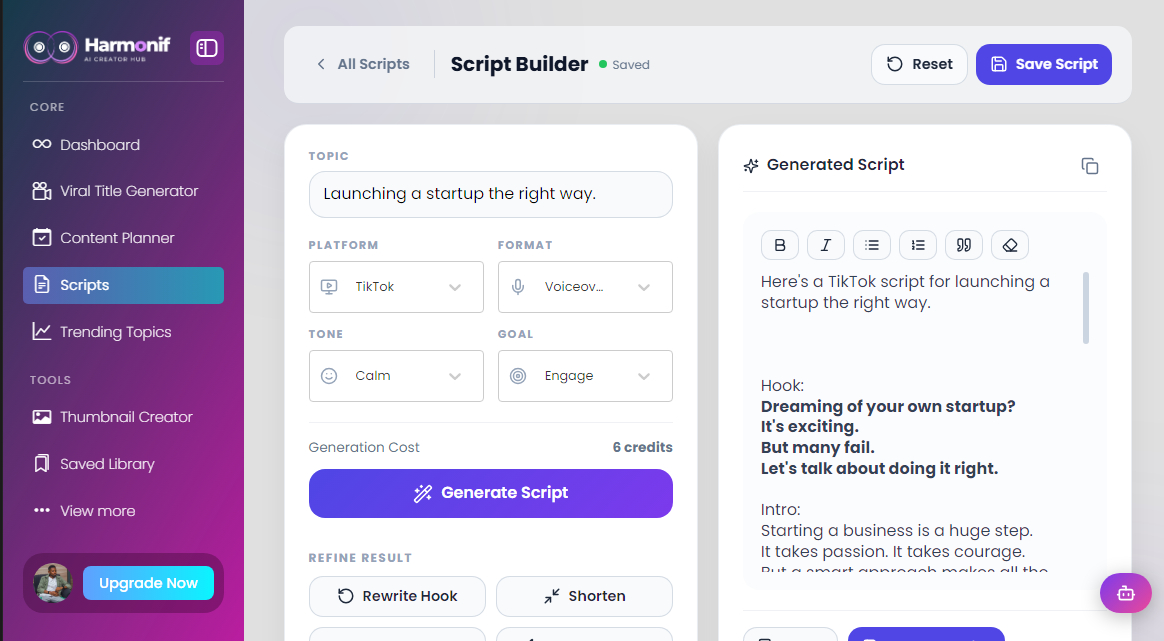
The Script Generator inside Harmonif fits this stage well because it helps you move from an idea into a structured script quickly while still leaving room for refinement. That becomes even more valuable when the same topic needs a long-form version, a Short version, and a social clip version in the same week.
The final check before recording
Before you hit record, read the script out loud. Mark every phrase that feels too polished, too formal, too repetitive, or too slow. Then remove at least ten percent of the words. Most scripts improve immediately when the creator trims explanation and sharpens the turns.
Also check whether the first fifteen seconds actually earn the next fifteen. In 2026, creators are competing inside feeds shaped by endless optionality. The opening does not need to be loud, but it does need to create movement. A clear tension, promise, or unexpected truth is usually enough.
AI can help you begin faster. It can even help you write better. But only a human creator can decide what should sound like you.
Common mistakes to avoid
The first mistake is treating how to use ai to write better video scripts without sounding robotic like a one-time tactic instead of a repeatable system. Most creators get temporary results when they test a better workflow once, but they fail to turn that workflow into a habit with clear steps, deadlines, and review points.
The second mistake is optimizing for output volume before clarity. More posts, more clips, or more titles do not help if the topic fit is weak, the package is vague, or the audience payoff is unclear. Strong creator workflows usually get simpler as they improve, not noisier.
The third mistake is skipping the review loop. A creator who never checks what actually performed, what felt easy to produce, and what should be turned into a repeatable format keeps starting over. The whole point of a system is to learn faster with each publishing cycle.
What to measure after publishing
Do not judge the success of a content workflow by vanity metrics alone. The better question is whether the content attracted the right audience and created a useful next step. For some posts that means watch time and retention. For others it means saves, replies, profile visits, click-throughs, or movement toward a product or newsletter action.
You should also measure production efficiency. If a topic performs well but takes an unsustainable amount of time to create, it may need a lighter format or a better workflow. The best systems improve both content quality and execution speed over time.
- Discovery metrics: impressions, reach, search visibility, and click-through rate
- Engagement metrics: watch time, saves, comments, replies, and meaningful shares
- Conversion metrics: email signups, app clicks, feature-page visits, and product actions
- Operational metrics: time to publish, number of revisions, and backlog completion rate
Frequently asked questions
Can AI write a full YouTube script?
Yes, but the best use is usually to generate structure and draft language that you then adapt. Fully untouched AI scripts often sound generic or overly formal.
How long should an AI-generated video script be?
It depends on the format. A Short may be 80 to 180 words, while a long-form educational video might need 1,200 to 2,500 spoken words depending on pace.
What makes an AI script sound robotic?
Generic introductions, repetitive sentence structure, vague examples, weak transitions, and a lack of lived specificity are the main reasons AI scripts sound robotic.
Referenced platform updates
This article reflects creator-platform guidance and trend signals current as of April 30, 2026.
Put this workflow into practice with Harmonif
Harmonif gives creators a faster path from idea to publish with tools for content planning, trend discovery, title generation, thumbnail ideation, script writing, and posting to socials.
Get started in the app or explore the full features overview.
A simple 7-day implementation plan
If you want to apply the ideas from How to Use AI to Write Better Video Scripts Without Sounding Robotic immediately, use the next seven days to turn the theory into a repeatable habit. Keep the scope narrow enough that you actually finish it, then improve it after the first cycle.
- Day 1: define the audience, topic, and outcome you want from the content
- Day 2: gather source material, examples, and recent audience questions
- Day 3: generate angles, titles, or outlines and choose the strongest direction
- Day 4: draft the main asset and map supporting content variations
- Day 5: package the asset with stronger visuals, captions, or supporting copy
- Day 6: schedule or publish the content and distribute it across the right surfaces
- Day 7: review what worked, document the lesson, and update next week’s workflow
By the end of the week, you should have more than a finished post. You should have a clearer process you can run again with less friction.
How different creators can apply this
An educational creator can use how to use ai to write better video scripts without sounding robotic to turn expertise into a more reliable publishing engine. Instead of relying on inspiration, the creator can map recurring audience questions into clear topic clusters, build stronger weekly assets, and repurpose the best lessons into supporting posts that keep discovery active across formats.
A product-led creator or founder can use the same workflow to bridge marketing and product education. Helpful content can answer objections, demonstrate features, compare approaches, and move people toward the next logical action without every post feeling like a sales pitch. This is especially valuable when the audience needs repeated context before converting.
A service provider or consultant can use the framework to turn client knowledge into a library of trust-building assets. The same process that creates a guide, title, or trend response can also create clips, FAQs, case-study angles, and calls to action that feed discovery while reinforcing authority.
In every case, the principle is the same: the workflow should reduce friction between expertise and publication. When the system works, content quality improves because more attention can go to insight and delivery instead of scattered logistics.
A decision framework for your next publishing cycle
When deciding whether to repeat, expand, or retire a content approach, use a simple framework. First, ask whether the topic attracted the right people. Second, ask whether the format made the idea easy to consume. Third, ask whether the workflow was efficient enough to repeat without draining your team or your own energy.
If the topic fit was strong but the package was weak, improve the title, thumbnail, caption, or opening hook. If the package worked but the audience payoff was weak, strengthen the angle itself. If the content worked but the execution felt too heavy, simplify the production path and keep the idea. This keeps you from abandoning good concepts because the process around them was messy.
Creators who grow steadily tend to review performance this way. They do not just ask whether a post “did numbers.” They ask what part of the system deserves to be repeated and what part needs redesign. That mindset makes every publishing cycle more valuable.
A practical resource checklist
Before your next piece of content goes live, make sure the operational pieces around how to use ai to write better video scripts without sounding robotic are actually prepared. Many creators lose momentum because the idea is strong but the surrounding assets are missing or inconsistent.
- A clear target audience and one-sentence content payoff
- At least three title or hook variations
- A visual plan or supporting image that reinforces the topic
- A short CTA connected to the next useful action
- A distribution plan for follow-up clips, social posts, or email reuse
- A review note for what to watch after publishing
This kind of checklist may look basic, but it removes avoidable friction. High-performing systems are rarely built on complexity. They are built on useful defaults repeated consistently.
How to keep the content aligned with your audience
The fastest way to waste a good workflow is to apply it to topics your audience does not actually care about. Before publishing, check whether the idea is tied to a real question, frustration, aspiration, or decision your audience already has. Relevance creates far more growth than empty volume.
One practical approach is to compare your draft against recent comments, DMs, support questions, customer calls, or search terms. If the language in the content feels disconnected from the language your audience uses naturally, refine the framing. Even a strong post will underperform if the audience cannot immediately recognize that it is for them.
This is also where category fit matters. A creator who talks to beginners should package the topic differently from a creator speaking to advanced operators. The workflow may stay the same, but the examples, pacing, and assumptions should match the person you want to help.