A content calendar looks productive even when it is unrealistic. That is the trap. Many creators spend hours building a neat schedule that never becomes published output because the plan ignores production time, energy limits, feedback loops, and the inevitable mess of real creative work.
The goal of a content calendar is not to impress you on Monday. It is to still be useful on Thursday when your energy is lower, a deadline moved, and a better idea appeared. In other words, the best content calendars are not just organized. They are durable.
If your current calendar keeps collapsing, the fix is usually operational, not motivational. You need fewer fantasy assumptions and a clearer path from idea to execution.
Why most content calendars fail
Most content calendars fail because they only track publish dates. They do not track the work required to get there. A creator sees “Post Thursday” on the calendar, but there is no visibility into whether the script is written, the thumbnail exists, the assets are approved, or the post has been adapted for each platform.
Calendars also fail when they are overstuffed. If every day carries the same workload regardless of editing complexity, meetings, or personal bandwidth, the plan becomes fake the moment the week begins. Consistency is not built on heroic scheduling. It is built on sustainable pacing.
Plan backward from capacity, not ambition
A realistic calendar starts with capacity. How many high-effort assets can you truly produce in a week? How many lower-effort support assets can you adapt from them? How much time is available for editing, design, review, and posting?
Once you know the real capacity, build the calendar around it. This feels less exciting than aiming for maximum volume, but it is much more powerful. A plan you can repeat beats an ambitious plan you abandon after ten days.
- Define a weekly maximum for hero assets
- Estimate production time for each asset type
- Leave margin for revisions and fast-moving topics
- Use recurring templates for lower-effort posts
- Review actual completion rates at the end of each week
Treat the calendar like a workflow board
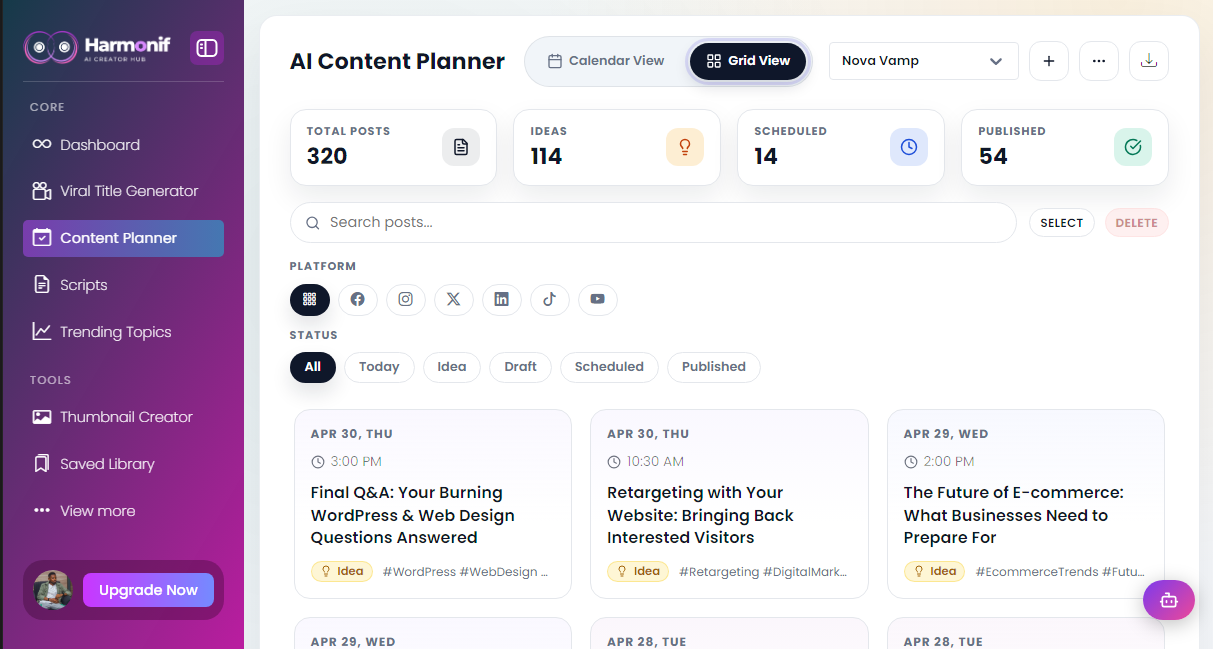
The calendar should show more than dates. It should show stages: idea, research, title, script, design, edit, scheduled, posted, and reviewed. This turns the calendar into a production system rather than a decorative timeline.
A workflow board also exposes bottlenecks. If items get stuck at “script” or “thumbnail,” you know where the process is breaking. Without stage visibility, creators often blame themselves for inconsistency when the real issue is a predictable operational choke point.
Build around repeatable content slots
One helpful approach is to assign recurring slot types rather than reinventing the week. For example, Tuesday might always be a tutorial video, Wednesday a short insight clip, Thursday a carousel summary, and Friday a distribution or repurposing day. The specific topics can change, but the production pattern stays familiar.
This reduces decision fatigue and makes batching easier. It also helps your audience learn what kind of value to expect from you on different days or surfaces.
Use AI and automation to protect momentum
This is where creator tools become operationally valuable. AI can help generate outlines, title variations, caption drafts, and platform rewrites. Scheduling and Post to socials features reduce the last-mile friction that often kills a good plan. A calendar is more likely to survive when the path from approved asset to published asset is short.
Harmonif’s planning stack is useful here because it keeps ideation, scripting, titles, trends, and publishing closer together. A tighter system reduces the number of moments where a task can disappear into a forgotten tab.
Measure completion, not just ideas
At the end of each week, review what actually shipped. Which asset types got completed? Which ones stalled? Which posts performed well enough to deserve a sequel? A calendar that is never reviewed becomes a guilt tracker. A calendar that is reviewed becomes a learning tool.
The healthiest calendar is not the fullest one. It is the one that keeps turning ideas into finished work.
Common mistakes to avoid
The first mistake is treating how to build a content calendar that actually gets published like a one-time tactic instead of a repeatable system. Most creators get temporary results when they test a better workflow once, but they fail to turn that workflow into a habit with clear steps, deadlines, and review points.
The second mistake is optimizing for output volume before clarity. More posts, more clips, or more titles do not help if the topic fit is weak, the package is vague, or the audience payoff is unclear. Strong creator workflows usually get simpler as they improve, not noisier.
The third mistake is skipping the review loop. A creator who never checks what actually performed, what felt easy to produce, and what should be turned into a repeatable format keeps starting over. The whole point of a system is to learn faster with each publishing cycle.
What to measure after publishing
Do not judge the success of a content workflow by vanity metrics alone. The better question is whether the content attracted the right audience and created a useful next step. For some posts that means watch time and retention. For others it means saves, replies, profile visits, click-throughs, or movement toward a product or newsletter action.
You should also measure production efficiency. If a topic performs well but takes an unsustainable amount of time to create, it may need a lighter format or a better workflow. The best systems improve both content quality and execution speed over time.
- Discovery metrics: impressions, reach, search visibility, and click-through rate
- Engagement metrics: watch time, saves, comments, replies, and meaningful shares
- Conversion metrics: email signups, app clicks, feature-page visits, and product actions
- Operational metrics: time to publish, number of revisions, and backlog completion rate
Frequently asked questions
What should a content calendar include?
A useful content calendar should include the topic, format, platform, publish date, status, CTA, and any dependencies such as scripts, thumbnails, or approvals.
How far ahead should creators plan content?
Most creators do best planning one to two weeks ahead in detail, while keeping a larger backlog of themes and topic ideas for the month.
What is the biggest mistake in content planning?
The biggest mistake is planning publish dates without planning the production stages needed to get the content finished.
Referenced platform updates
This article reflects creator-platform guidance and trend signals current as of April 30, 2026.
Put this workflow into practice with Harmonif
Harmonif gives creators a faster path from idea to publish with tools for content planning, trend discovery, title generation, thumbnail ideation, script writing, and posting to socials.
Get started in the app or explore the full features overview.
A simple 7-day implementation plan
If you want to apply the ideas from How to Build a Content Calendar That Actually Gets Published immediately, use the next seven days to turn the theory into a repeatable habit. Keep the scope narrow enough that you actually finish it, then improve it after the first cycle.
- Day 1: define the audience, topic, and outcome you want from the content
- Day 2: gather source material, examples, and recent audience questions
- Day 3: generate angles, titles, or outlines and choose the strongest direction
- Day 4: draft the main asset and map supporting content variations
- Day 5: package the asset with stronger visuals, captions, or supporting copy
- Day 6: schedule or publish the content and distribute it across the right surfaces
- Day 7: review what worked, document the lesson, and update next week’s workflow
By the end of the week, you should have more than a finished post. You should have a clearer process you can run again with less friction.
How different creators can apply this
An educational creator can use how to build a content calendar that actually gets published to turn expertise into a more reliable publishing engine. Instead of relying on inspiration, the creator can map recurring audience questions into clear topic clusters, build stronger weekly assets, and repurpose the best lessons into supporting posts that keep discovery active across formats.
A product-led creator or founder can use the same workflow to bridge marketing and product education. Helpful content can answer objections, demonstrate features, compare approaches, and move people toward the next logical action without every post feeling like a sales pitch. This is especially valuable when the audience needs repeated context before converting.
A service provider or consultant can use the framework to turn client knowledge into a library of trust-building assets. The same process that creates a guide, title, or trend response can also create clips, FAQs, case-study angles, and calls to action that feed discovery while reinforcing authority.
In every case, the principle is the same: the workflow should reduce friction between expertise and publication. When the system works, content quality improves because more attention can go to insight and delivery instead of scattered logistics.
A decision framework for your next publishing cycle
When deciding whether to repeat, expand, or retire a content approach, use a simple framework. First, ask whether the topic attracted the right people. Second, ask whether the format made the idea easy to consume. Third, ask whether the workflow was efficient enough to repeat without draining your team or your own energy.
If the topic fit was strong but the package was weak, improve the title, thumbnail, caption, or opening hook. If the package worked but the audience payoff was weak, strengthen the angle itself. If the content worked but the execution felt too heavy, simplify the production path and keep the idea. This keeps you from abandoning good concepts because the process around them was messy.
Creators who grow steadily tend to review performance this way. They do not just ask whether a post “did numbers.” They ask what part of the system deserves to be repeated and what part needs redesign. That mindset makes every publishing cycle more valuable.
A practical resource checklist
Before your next piece of content goes live, make sure the operational pieces around how to build a content calendar that actually gets published are actually prepared. Many creators lose momentum because the idea is strong but the surrounding assets are missing or inconsistent.
- A clear target audience and one-sentence content payoff
- At least three title or hook variations
- A visual plan or supporting image that reinforces the topic
- A short CTA connected to the next useful action
- A distribution plan for follow-up clips, social posts, or email reuse
- A review note for what to watch after publishing
This kind of checklist may look basic, but it removes avoidable friction. High-performing systems are rarely built on complexity. They are built on useful defaults repeated consistently.
How to keep the content aligned with your audience
The fastest way to waste a good workflow is to apply it to topics your audience does not actually care about. Before publishing, check whether the idea is tied to a real question, frustration, aspiration, or decision your audience already has. Relevance creates far more growth than empty volume.
One practical approach is to compare your draft against recent comments, DMs, support questions, customer calls, or search terms. If the language in the content feels disconnected from the language your audience uses naturally, refine the framing. Even a strong post will underperform if the audience cannot immediately recognize that it is for them.
This is also where category fit matters. A creator who talks to beginners should package the topic differently from a creator speaking to advanced operators. The workflow may stay the same, but the examples, pacing, and assumptions should match the person you want to help.
How to reuse the best results
Once a post performs well, the job is not finished. Strong creator systems reuse wins deliberately. A successful article can become a script. A successful script can become a Short. A strong social post can become an FAQ, a feature-page support section, or a newsletter issue. This is how one useful insight turns into a full content asset stack.
Reusing results also improves SEO and discoverability because it creates more connected assets around the same intent. Instead of producing ten disconnected topics, you build a cluster of related content that reinforces your authority and gives the audience multiple ways to enter the conversation.
The real question after every successful post is simple: what is the next logical version of this idea? Creators who answer that consistently build stronger libraries, not just isolated wins.