Creators still talk about click-through rate as if it were the whole game. It is not. In 2026, YouTube itself makes the priority clear: great titles and thumbnails do more than trigger a click. They help the right viewer understand the promise of the video, which increases the chance that the viewer stays, watches, and trusts you enough to come back.
That is why a better question is not, how do I make my title more clickable? The better question is, how do I make my title and thumbnail accurately irresistible? The accuracy matters because misleading packaging destroys retention. The irresistible part matters because even a brilliant video fails if no one gives it a chance.
YouTube’s own creator guidance says that 90% of the best-performing videos have custom thumbnails. Its updated testing tools also emphasize watch time, not just CTR, when deciding winning title-and-thumbnail combinations. That alone should change how creators package their videos.
The job of a title and thumbnail
A title and thumbnail work as a pair. The title frames the story. The thumbnail intensifies or clarifies the promise. Together, they help a viewer decide whether the video is relevant, interesting, and worth their time.
When this pair works well, viewers feel like the video delivered exactly what they expected, only better. When it works badly, the video may attract a click but lose the viewer within seconds. That is why sensational packaging often hurts growth over time: it creates curiosity without trust.
The strongest title-thumbnail pairs usually do three things at once. They define the topic clearly, inject tension or curiosity, and stay readable on a small screen.
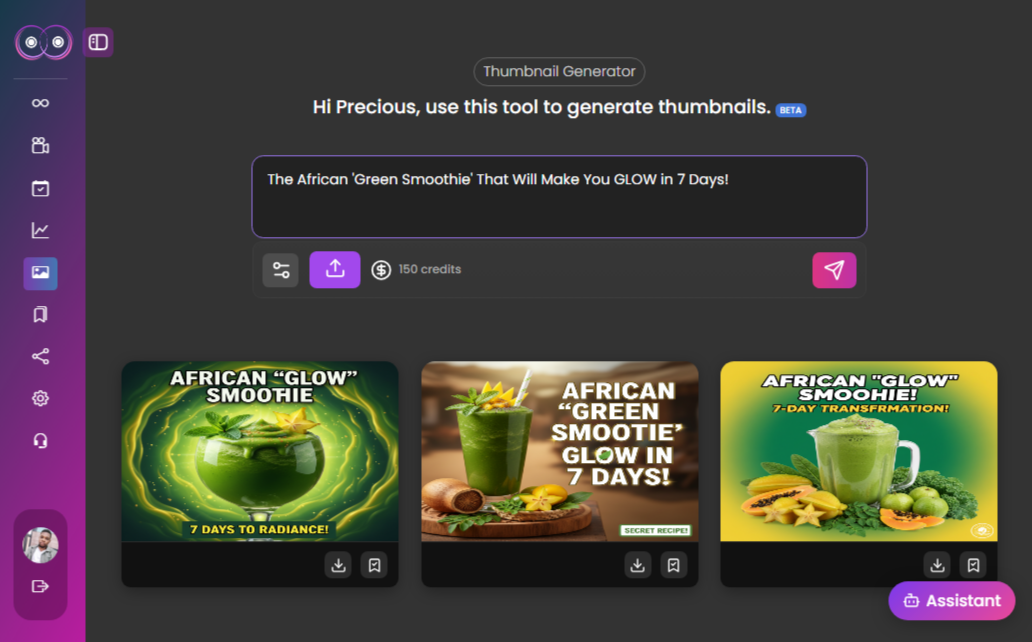
What YouTube recommends in 2026
YouTube’s official thumbnail and title guidance is refreshingly practical. It recommends that creators keep thumbnails visually clear, avoid making the design too complex, use readable text when text is added, and place the most important words near the beginning of the title. The Help Center also notes that different audiences prefer different styles, so staying current in your niche matters.
The newer A/B testing guidance goes even further. YouTube says creators can test up to three titles and thumbnails, and the winner is determined by watch time. That is a critical insight because it reinforces the idea that high-quality engagement matters more than raw clickbait.
The platform also warns that titles should accurately represent the video. Accuracy is not a boring rule. It is the foundation of discoverability because YouTube responds to how viewers interact with the video after it is shown.
How to write a better title
Start by identifying the core promise in the video. What will the viewer understand, solve, achieve, or avoid by watching? That promise should usually appear near the beginning of the title so it is still visible on mobile and in crowded recommendation panels.
Next, sharpen the hook without corrupting the meaning. This can come from contrast, a surprising result, a direct challenge, a useful timeframe, or a high-stakes mistake. Examples include “I Tried Posting Daily for 30 Days”, “The Script Fix That Raised Retention”, or “Why Most Creator Calendars Fail by Friday”. Each title gives a clear topic and a reason to care.
Keep brand names, episode numbers, and extra flair at the end. YouTube explicitly advises creators to put the most important words first. If the first half of your title is vague, the viewer may never reach the useful part.
- Lead with the clearest keyword or topic phrase
- Add one strong curiosity lever, not five weak ones
- Keep the wording accurate to the actual video
- Avoid clutter, filler, and overused hype phrases
- Write several options before choosing the final version
How to design a thumbnail that supports watch time
A good thumbnail does not need to explain the whole video. It needs to create immediate recognition and emotional direction. YouTube recommends readable text, strong composition, and designs that are not too complex. Those guidelines sound basic, but they directly address the biggest creator mistake: cramming too many ideas into one image.
Use one focal point. That might be a face, a result, a visual before-and-after, or a strong object tied to the topic. If you use text, keep it short and legible. If your brand uses recurring colors or layout logic, keep them consistent enough to build familiarity without making every thumbnail identical.
Also design for unfamiliar viewers, not just loyal subscribers. A returning audience may recognize your patterns, but casual viewers need immediate clarity. Ask yourself whether someone with zero context can guess what category of problem the video addresses.
Why testing matters more than opinion
Creators often argue endlessly about what title or thumbnail is “better” when the real answer depends on audience behavior. YouTube now lets eligible creators A/B test titles and thumbnails directly in Studio. According to its documentation, the test can run for up to two weeks, and the platform uses watch time to determine which option wins.
This matters because many third-party tools and creator debates optimize for click-through rate alone. YouTube’s own documentation explains that a winning package should help viewers choose the right video, not trick the wrong viewers into clicking. That distinction protects long-term growth.
Testing also teaches taste. Even when there is no statistically clear winner, you learn which visual directions create more qualified attention. Over time, these learnings are more valuable than any single thumbnail.
Using Harmonif to improve packaging
Harmonif can help compress the packaging workflow significantly. The Viral Titles Generator gives you multiple hook directions around the same topic, which is useful when you know the promise but need stronger phrasing. The Thumbnail Generator helps you move from vague ideas to clearer visual concepts. Together, they reduce the temptation to publish your first acceptable option.
This is especially useful when you are building a repeatable content system. Strong packaging should not depend on last-minute inspiration. It should come from a process that combines research, variation, and judgment.
Common mistakes to avoid
The first mistake is treating youtube titles and thumbnails in 2026: how to win more watch time like a one-time tactic instead of a repeatable system. Most creators get temporary results when they test a better workflow once, but they fail to turn that workflow into a habit with clear steps, deadlines, and review points.
The second mistake is optimizing for output volume before clarity. More posts, more clips, or more titles do not help if the topic fit is weak, the package is vague, or the audience payoff is unclear. Strong creator workflows usually get simpler as they improve, not noisier.
The third mistake is skipping the review loop. A creator who never checks what actually performed, what felt easy to produce, and what should be turned into a repeatable format keeps starting over. The whole point of a system is to learn faster with each publishing cycle.
What to measure after publishing
Do not judge the success of a content workflow by vanity metrics alone. The better question is whether the content attracted the right audience and created a useful next step. For some posts that means watch time and retention. For others it means saves, replies, profile visits, click-throughs, or movement toward a product or newsletter action.
You should also measure production efficiency. If a topic performs well but takes an unsustainable amount of time to create, it may need a lighter format or a better workflow. The best systems improve both content quality and execution speed over time.
- Discovery metrics: impressions, reach, search visibility, and click-through rate
- Engagement metrics: watch time, saves, comments, replies, and meaningful shares
- Conversion metrics: email signups, app clicks, feature-page visits, and product actions
- Operational metrics: time to publish, number of revisions, and backlog completion rate
Frequently asked questions
Do better thumbnails increase watch time?
Better thumbnails can increase qualified clicks, and qualified clicks often improve watch time because the right viewers understand what the video promises before they click.
Should I optimize for CTR or watch time?
Aim for both, but prioritize qualified watch time. YouTube’s own A/B testing guidance uses watch time to judge winners because it reflects stronger viewer satisfaction.
How many title options should I write?
Write at least five. Most weak titles come from settling on the first clear option instead of exploring stronger hook structures around the same topic.
Referenced platform updates
This article reflects creator-platform guidance and trend signals current as of April 30, 2026.
Put this workflow into practice with Harmonif
Harmonif gives creators a faster path from idea to publish with tools for content planning, trend discovery, title generation, thumbnail ideation, script writing, and posting to socials.
Get started in the app or explore the full features overview.
A simple 7-day implementation plan
If you want to apply the ideas from YouTube Titles and Thumbnails in 2026: How to Win More Watch Time immediately, use the next seven days to turn the theory into a repeatable habit. Keep the scope narrow enough that you actually finish it, then improve it after the first cycle.
- Day 1: define the audience, topic, and outcome you want from the content
- Day 2: gather source material, examples, and recent audience questions
- Day 3: generate angles, titles, or outlines and choose the strongest direction
- Day 4: draft the main asset and map supporting content variations
- Day 5: package the asset with stronger visuals, captions, or supporting copy
- Day 6: schedule or publish the content and distribute it across the right surfaces
- Day 7: review what worked, document the lesson, and update next week’s workflow
By the end of the week, you should have more than a finished post. You should have a clearer process you can run again with less friction.
How different creators can apply this
An educational creator can use youtube titles and thumbnails in 2026: how to win more watch time to turn expertise into a more reliable publishing engine. Instead of relying on inspiration, the creator can map recurring audience questions into clear topic clusters, build stronger weekly assets, and repurpose the best lessons into supporting posts that keep discovery active across formats.
A product-led creator or founder can use the same workflow to bridge marketing and product education. Helpful content can answer objections, demonstrate features, compare approaches, and move people toward the next logical action without every post feeling like a sales pitch. This is especially valuable when the audience needs repeated context before converting.
A service provider or consultant can use the framework to turn client knowledge into a library of trust-building assets. The same process that creates a guide, title, or trend response can also create clips, FAQs, case-study angles, and calls to action that feed discovery while reinforcing authority.
In every case, the principle is the same: the workflow should reduce friction between expertise and publication. When the system works, content quality improves because more attention can go to insight and delivery instead of scattered logistics.
A decision framework for your next publishing cycle
When deciding whether to repeat, expand, or retire a content approach, use a simple framework. First, ask whether the topic attracted the right people. Second, ask whether the format made the idea easy to consume. Third, ask whether the workflow was efficient enough to repeat without draining your team or your own energy.
If the topic fit was strong but the package was weak, improve the title, thumbnail, caption, or opening hook. If the package worked but the audience payoff was weak, strengthen the angle itself. If the content worked but the execution felt too heavy, simplify the production path and keep the idea. This keeps you from abandoning good concepts because the process around them was messy.
Creators who grow steadily tend to review performance this way. They do not just ask whether a post “did numbers.” They ask what part of the system deserves to be repeated and what part needs redesign. That mindset makes every publishing cycle more valuable.
A practical resource checklist
Before your next piece of content goes live, make sure the operational pieces around youtube titles and thumbnails in 2026: how to win more watch time are actually prepared. Many creators lose momentum because the idea is strong but the surrounding assets are missing or inconsistent.
- A clear target audience and one-sentence content payoff
- At least three title or hook variations
- A visual plan or supporting image that reinforces the topic
- A short CTA connected to the next useful action
- A distribution plan for follow-up clips, social posts, or email reuse
- A review note for what to watch after publishing
This kind of checklist may look basic, but it removes avoidable friction. High-performing systems are rarely built on complexity. They are built on useful defaults repeated consistently.
How to keep the content aligned with your audience
The fastest way to waste a good workflow is to apply it to topics your audience does not actually care about. Before publishing, check whether the idea is tied to a real question, frustration, aspiration, or decision your audience already has. Relevance creates far more growth than empty volume.
One practical approach is to compare your draft against recent comments, DMs, support questions, customer calls, or search terms. If the language in the content feels disconnected from the language your audience uses naturally, refine the framing. Even a strong post will underperform if the audience cannot immediately recognize that it is for them.
This is also where category fit matters. A creator who talks to beginners should package the topic differently from a creator speaking to advanced operators. The workflow may stay the same, but the examples, pacing, and assumptions should match the person you want to help.